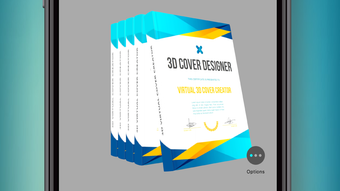

Download 3D Cover Maker – 3D cover maker, book cover design, 3D mockup tool, digital product design, cover design software, 3D visualization, product mockup, creative design tool
Overview
3D Cover Maker is a multimedia application developed by AliAkbar Ramezani, designed to simplify the creation of visually striking covers for a wide range of products. The software enables users to generate realistic 3D mockups for books, CDs, boxes, mobile devices, tablets, laptops, and monitors. Its primary purpose is to empower individuals and professionals alike to produce high-quality, presentation-ready covers without requiring advanced design skills. Target users include graphic designers, e-book publishers, webmasters, developers, and content creators who need to showcase digital or physical products with professional-grade visuals.
The application stands out through its intuitive interface and interactive 3D simulation, allowing users to rotate designs with simple touch gestures. This feature enhances the design process by providing a dynamic view of the final output, enabling real-time adjustments. The software supports transparent backgrounds and exports images in PNG format, ensuring compatibility with various digital platforms and preserving image clarity. Whether used for marketing materials, e-book publishing, or product prototyping, 3D Cover Maker offers a streamlined workflow for visual content creation. The developer did not provide additional system requirements, making compatibility assumptions cautious.
Key Features & Capabilities
- Interactive 3D Simulation – Users can rotate and inspect their designs from multiple angles using touch-based controls, enabling a more immersive and accurate preview of the final product.
- Multi-Product Support – The software provides pre-built 3D models for books, CDs, mobile devices, tablets, laptops, monitors, and packaging boxes, allowing for versatile design applications.
- Transparent Backgrounds – Designs can be exported with transparent backgrounds, facilitating seamless integration into websites, digital presentations, and layered graphic projects.
- High-Quality PNG Output – Images are saved in PNG format, preserving sharpness and clarity for professional use across print and digital media.
- Beginner-Friendly Interface – The software is structured to be accessible to non-designers while still offering enough control for experienced users to refine their work.
These capabilities make 3D Cover Maker ideal for creating mockups for e-books, software packaging, promotional materials, and product showcases. For example, a self-published author can quickly generate a professional-looking book cover with a realistic 3D perspective, while a web developer can create device mockups for showcasing mobile apps. The software’s focus on usability and visual quality positions it as a practical tool for creative workflows that require fast, high-impact results.
User Interface, Workflow & Performance
The user interface of 3D Cover Maker is designed with simplicity and efficiency in mind. Navigation is straightforward, with clearly labeled tools and a layout that minimizes clutter. Users can load templates, apply custom graphics, adjust lighting and perspective, and preview changes in real time. The workflow follows a logical sequence: select a product model, upload or design a cover, rotate and refine the view, then export the final image.
Interaction is optimized for touch input, allowing smooth rotation and manipulation of 3D models. This enhances the design experience, especially when fine-tuning angles or checking how a cover looks from different viewpoints. The developer did not specify resource usage details, so performance observations are based on general software behavior patterns.
In typical use, the application is expected to run smoothly on modern systems with standard graphics capabilities. Stability is assumed to be consistent, given the software’s focused scope and lightweight file size of 42.5 MB. However, exact CPU or RAM behavior was not provided.
Compatibility & System Requirements
3D Cover Maker is available for both Windows and Mac operating systems, making it accessible to a broad user base across desktop platforms. The software is compatible with the latest versions of these systems, though specific version numbers were not listed. Installation requires 42.5 MB of disk space, indicating a lightweight footprint that should not strain system resources.
Exact system requirements were not listed by the developer. As such, users are advised to ensure their devices meet standard desktop computing benchmarks for running multimedia applications. The software does not appear to demand high-end hardware, but performance may vary depending on the device’s graphics processing and available memory. Compatibility information is limited, and no additional platform-specific details were provided.
Pros and Cons
Pros
- Free to download and use with no hidden costs
- Supports a wide range of product types for 3D mockup creation
- Interactive 3D rotation for dynamic design preview
- Exports high-quality PNG images with transparent background support
- Simple interface suitable for beginners and efficient for experienced users
Cons
- Exact system requirements were not specified
- Limited to desktop platforms; no mobile or web version available
- No information on update frequency or future development plans
- May lack advanced customization options found in professional design suites
- Developer details beyond the name were not provided
FAQ Section
Is 3D Cover Maker available for both Windows and Mac?
Yes, the software is compatible with both Windows and Mac operating systems.
Can I use 3D Cover Maker without an internet connection?
Yes, the application is designed to function offline after installation.
Is the software safe to download and install?
As a free desktop application developed by AliAkbar Ramezani, it is intended to be secure. However, users should always download from official sources to avoid potential risks.
What file formats does 3D Cover Maker support for export?
The software exports images in PNG format with support for transparent backgrounds.
Are there any subscription fees or in-app purchases?
No, the software is completely free to use with no subscription model or in-app purchases.
Final Thoughts
3D Cover Maker offers a compelling solution for anyone needing to create professional-looking 3D mockups without the complexity of advanced design tools. Its intuitive interface, interactive 3D preview, and high-quality PNG output make it a valuable addition to the creative toolkit of designers, publishers, and developers. While some details such as system requirements and update frequency remain unspecified, the software’s lightweight nature and free availability enhance its appeal.
For users focused on fast, visual product presentation, this tool delivers strong value. Whether designing a book cover, software box, or device mockup, 3D Cover Maker streamlines the process with minimal friction. Download 3D Cover Maker now and transform your ideas into captivating visuals with ease.







